

What is System Development? How is a system built?

When people hear “system development,” they often imagine software being coded. A project can also include activities such as clarifying objectives, users, requirements, design, testing, and operation. How these activities are organized depends on the development approach and project context.
1. What is system development?
System development is the process of creating a new system or improving an existing one to support a specific task or need. It may be an ordering website, a mobile app, HR management software, an inventory management system, a customer portal, or a tool that connects data across multiple departments.
For example, a “Create Order” screen may look simple, but behind it there may be customer information, inventory data, user permissions, delivery status, and accounting data. A system is therefore more than the screens users see.
System development commonly includes activities such as understanding needs, clarifying requirements, design, coding, testing, and putting the system into use. Their sequence, degree of iteration, and organization depend on the development approach and project context. After launch, the system may continue to be adjusted or expanded as needs change.
However, a good system does not necessarily need a large number of features. What matters more is whether it helps users complete their work more easily, reduces unnecessary steps, or solves the problem the business is facing.
So alongside asking “Which features should we build?”, it is useful to clarify “Which work should the system support, and what outcome needs to change?”
2. How is a system built?
Every project is delivered differently, but turning a need into a usable system usually involves several basic steps.
The first step is understanding the need. For example, employees may be entering the same data multiple times, customers may find it difficult to track order status, or different departments may be managing information in separate files.
From that need, the project team clarifies who the system needs to support and what it needs to do. For example, if the goal is to reduce manual data entry, the team needs to understand where the data is currently entered, who uses it, and which steps could be automated.
Once there is enough information for the scope being addressed, the project team can design how the system should work: how users interact with it, how information is displayed, and how data is stored and exchanged. In iterative approaches, requirements and design may continue to be refined as new information becomes available.
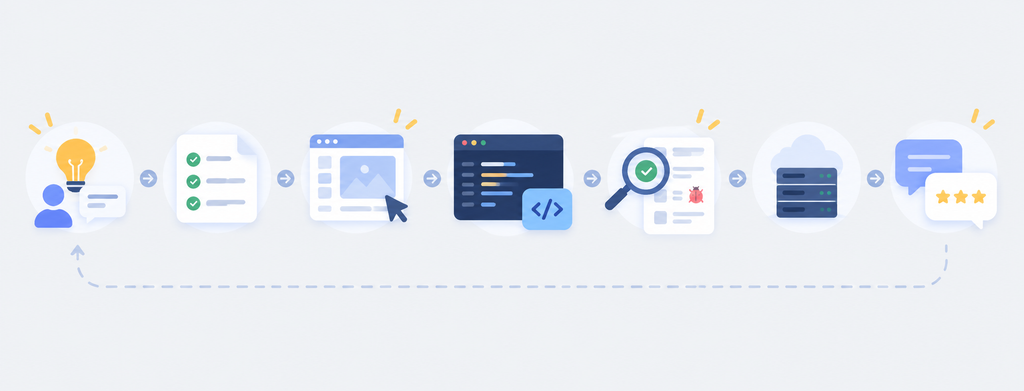
Next comes development, when the technical team builds the system based on the agreed design. In many projects, different parts of the system are completed and reviewed gradually so stakeholders can see them early instead of waiting until the end.
Then comes testing. Besides finding bugs, this step checks whether the system works correctly in real situations. For example, can the right user see the right information, is the data updated correctly, and does an end-to-end workflow run as expected?
When the system is stable enough, it is put into use. However, release does not mean the work is finished. Users may identify areas that need adjustment, processes may change, and new features may be needed after the system has been in operation for some time.
These steps also do not always happen once in a fixed sequence and then end. Many projects return to requirements, revise the design, or test again when new information appears.
3. Where should the business be involved?
Taking part in a project does not mean everyone on the business side must know how to code. A key contribution from the business side is usually operational knowledge: where problems occur, who performs the work, and what needs to improve.
Depending on the project model, the business side may provide information such as current processes, users, data, pain points, and constraints such as timeline or budget. The technical team uses these inputs together with other requirements to evaluate delivery options.
During development, one important role for the business side is to check whether the product matches the agreed operational needs. Reviewing a prototype or a feature in progress can help identify differences in understanding early.
After the system is put into use, user feedback continues to show what needs to be improved. The business therefore remains involved throughout the system lifecycle, not only in the first discussion.
4. What makes a system genuinely useful?
A system may include every documented feature and still not meet practical needs well. Its value depends on several factors, including whether it addresses the identified problem and can be used within the actual workflow.
One factor to evaluate is how well the system fits the actual workflow. If the software creates additional manual steps, requires repeated data entry, or leaves substantial work outside the system, the expected benefit may be affected.
Another factor is how the system will be operated and changed after release. Bugs may appear, processes may change, and external systems may be updated, so maintenance and post-release support should be considered according to the system’s scope and operating conditions.
Not every need requires a new system to be built from scratch. If an off-the-shelf product meets the important requirements and constraints, it may be an option to consider. Custom development is often evaluated when workflows are highly specific, deep integration is required, or the business needs a level of control that standard products do not provide.
At Fenix, system development starts with understanding the real context and needs before moving into the technical solution. The goal is to maintain the same understanding from requirements through design, development, testing, and operation.